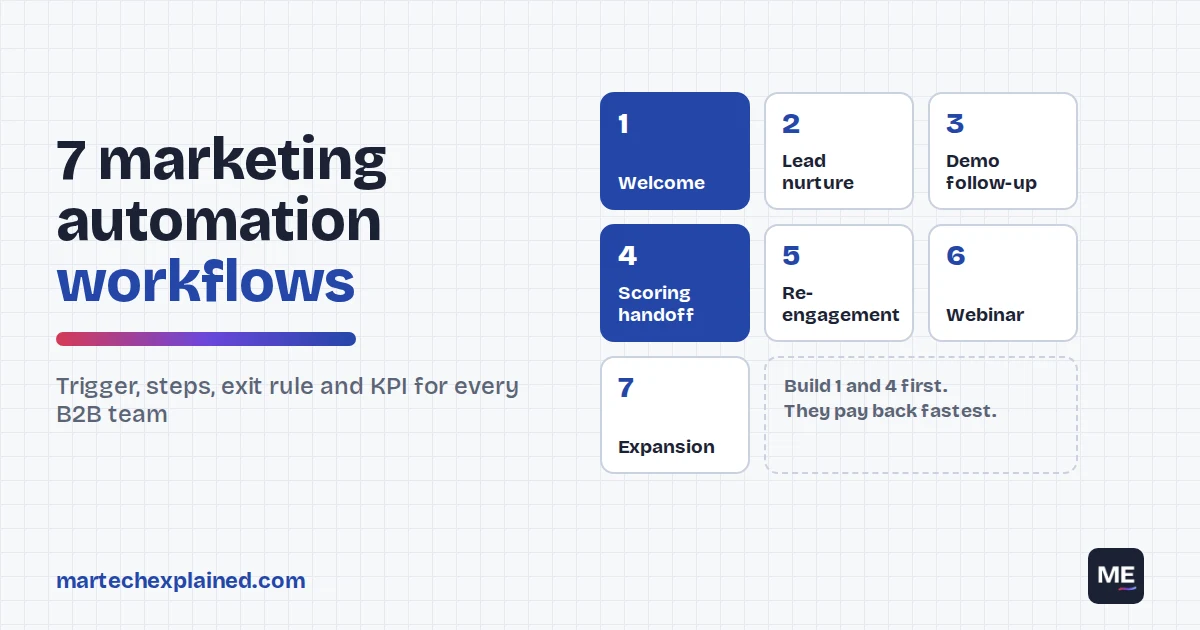
Most B2B teams buy a marketing automation tool, build a welcome email and stop there. The tool can do far more, but nobody has time to design workflows from a blank canvas.
This guide gives you seven workflows as spec cards you can copy into HubSpot, ActiveCampaign, Brevo or any other platform. Each card lists the trigger, steps, timing, exit rule and the one metric the workflow should move. If you’re new to the topic, start with what marketing automation is.
This guide in 30 seconds
- 7 workflows, each written as a spec: trigger, steps, timing, exit rule and KPI.
- Build the welcome series and the sales handoff first. They pay back fastest.
- Branch on clicks, not opens. Apple Mail Privacy Protection makes opens unreliable.
- Leads contacted within an hour were nearly 7 times as likely to be qualified (HBR, 2011).
- Every workflow needs an exit rule, or customers keep getting nurture emails.
Table of Contents
How to read these workflows
Each workflow below has the same spec card, so you can compare them and hand them to whoever builds them.
- Trigger: the event that enrolls a contact.
- Steps and timing: what happens, in order, with the wait between steps.
- Exit rule: what removes someone early, such as booking a demo or becoming a customer.
- KPI: the one number that tells you the workflow works.
Four rules apply to all seven:
- Use clicks, not opens. Apple Mail Privacy Protection loads emails in the background, so an open doesn’t mean a person read it (Apple).
- Suppress customers and open deals from every prospect workflow.
- Tag every link with UTM parameters. Use the workflow name as utm_campaign so GA4 shows which workflow drove the visit. The free UTM builder keeps names consistent.
- Write the workflow down before you build it. Branches and action limits differ by plan, so check yours first.
1. Welcome and onboarding
This is the first workflow every team should build. It turns a new subscriber or lead into someone who has clicked, read and engaged at least once.
| Spec | Detail |
|---|---|
| Trigger | Newsletter sign-up or content download form |
| Goal | First engagement within 7 days |
| Exit rule | Books a demo, becomes a customer or unsubscribes |
| KPI | Share of new contacts who click at least once in the series |
- Immediately: email 1 delivers what they asked for and says what to expect next.
- Wait 2 days: email 2 sends your best guide or a short case study.
- Wait 3 days: branch on whether they clicked email 1 or 2.
- If yes: tag as engaged and enroll in lead nurture (workflow 2).
- If no: email 3 makes one clear offer with a single call to action.
This is the same welcome workflow we built in all three tools in our HubSpot vs ActiveCampaign vs Brevo comparison. ActiveCampaign Starter can’t build it, because it doesn’t allow branching.
2. Lead nurture
Nurture keeps you in front of leads who aren’t ready to talk to sales. Its real job is to get you on the shortlist before the buyer reaches out.
That matters because buyers do most of the work alone. In 6sense’s 2025 survey of nearly 4,000 B2B buyers, first contact with sellers came 61% of the way through the buying process. Buyers started 79% of those conversations, and the winning vendor was on the day-one shortlist 95% of the time (6sense, 2025).
| Spec | Detail |
|---|---|
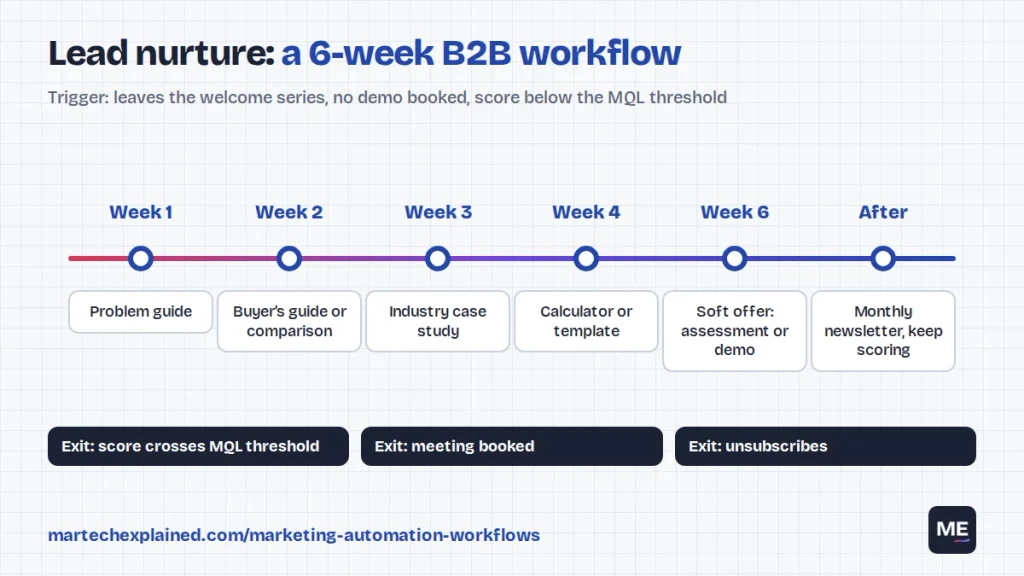
| Trigger | Leaves the welcome series without booking a demo, and lead score is below the MQL threshold |
| Goal | Move the lead to MQL or a booked meeting |
| Exit rule | Score crosses the MQL threshold, a meeting is booked or they unsubscribe |
| KPI | Share of nurtured leads that become MQLs within 90 days |
- Week 1: a guide that frames the problem in the reader’s terms, not your product’s.
- Week 2: a buyer’s guide or comparison that helps them build a shortlist.
- Week 3: a case study from their industry or company size.
- Week 4: a calculator, template or checklist they can use today.
- Week 6: a soft offer, such as a 20-minute assessment or demo.
- After week 6: move to the monthly newsletter and keep scoring their activity.
Split paths by role if you can. A marketing manager and a CFO need different week-2 and week-3 emails, even if the rest of the track is shared.
3. Demo or trial follow-up
A booked demo is the most valuable action in most B2B funnels, and every no-show is a lead you paid for. This workflow protects the meeting and follows up on the same day.
| Spec | Detail |
|---|---|
| Trigger | Demo booked, or free trial started |
| Goal | The prospect attends the demo, or activates during the trial |
| Exit rule | Deal closed won or lost, or the trial converts to paid |
| KPI | Demo show rate, or trial-to-paid conversion rate |
- Immediately: confirmation with a calendar invite and one question about their goals.
- 1 day before: reminder with the agenda and who will attend.
- 1 hour before: short reminder with the meeting link, by email or SMS.
- If they attend: create a task for the rep to send a recap the same day, from their own inbox.
- If they don’t show: send a reschedule link right away and alert the rep.
For a free trial, swap the steps for setup help on day 1, the key feature on day 3 and a rep check-in on day 7 if they haven’t activated. Send a reminder 2 days before the trial ends. Define “activated” as one product event, such as connecting a data source, and sync it to your CRM.
4. Lead scoring handoff to sales
This workflow decides when a lead goes to sales and makes sure someone follows up fast. Speed matters more than most teams think. An audit of 2,241 US companies found the average first response took 42 hours. Firms that responded within an hour were nearly 7 times as likely to qualify the lead (Harvard Business Review, 2011).
| Spec | Detail |
|---|---|
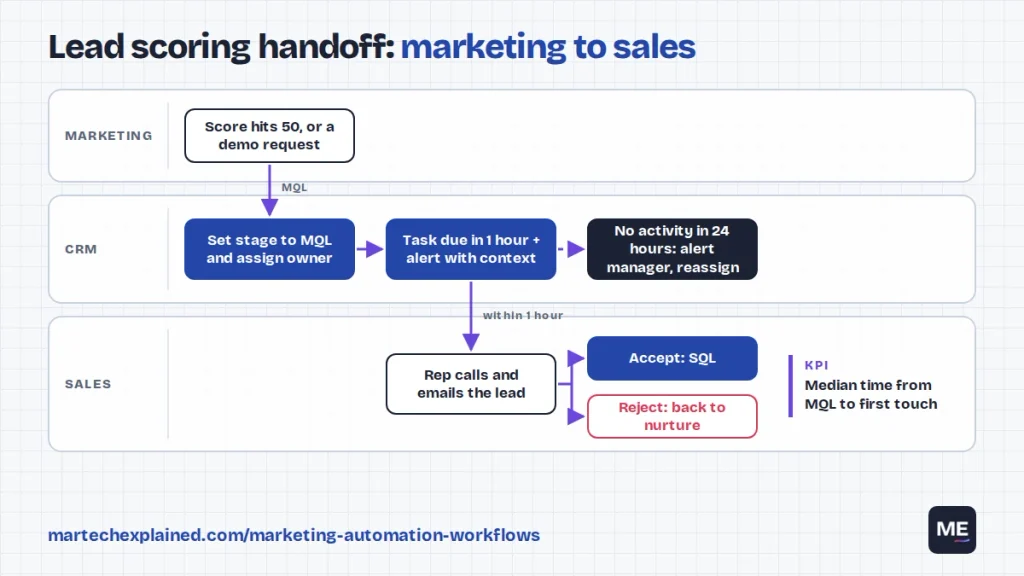
| Trigger | Lead score crosses the MQL threshold, or the lead asks for pricing or a demo |
| Goal | A rep contacts every MQL within 1 working hour |
| Exit rule | The rep accepts the lead (SQL) or rejects it with a reason |
| KPI | Median time from MQL to first touch, and MQL-to-SQL rate |
- Immediately: set the lifecycle stage to MQL and assign an owner by territory or rotation.
- Immediately: create a task due in 1 hour and alert the owner with context: pages viewed, emails clicked and UTM source.
- Immediately: send the lead a short, plain-text email from the owner.
- After 24 hours with no rep activity: alert the sales manager and reassign.
- If the rep rejects the lead: record the reason and return them to nurture.
A simple lead scoring model is enough to start. Score what people do and who they are, then lower scores over time:
| Signal | Points |
|---|---|
| Visited the pricing page | +15 |
| Visited the demo or contact page | +20 |
| Attended a webinar | +10 |
| Clicked a nurture email | +3 per click |
| Job title matches your buyer | +15 |
| Uses a personal email domain | -10 |
| No activity for 30 days | -10 |
Start with an MQL threshold of about 50 and review it monthly with sales. If reps reject most MQLs, raise the threshold. If they ask for more leads, lower it.
5. Re-engagement
Contacts who stop clicking drag down deliverability for everyone else on your list. This workflow either wins them back or removes them cleanly.
| Spec | Detail |
|---|---|
| Trigger | No email clicks in 90 days, and not a customer |
| Goal | Reactivate or remove inactive contacts |
| Exit rule | Any click returns them to normal sending |
| KPI | Share of contacts reactivated, and spam complaint rate |
- Day 1: “Still want these?” with your three most useful recent pieces.
- Day 8: a preference link where they can choose topics or monthly-only emails.
- Day 15: a last email that says you’ll stop sending on a set date.
- Day 22, no click: unsubscribe or suppress them, and keep the record in your CRM.
This protects your sending reputation. Gmail requires bulk senders to keep spam complaint rates below 0.30% and to offer one-click unsubscribe (Google). Unengaged contacts are the ones most likely to mark you as spam.
6. Webinar and event
Webinars generate leads in two waves: people who attend live and people who watch later. In ON24’s 2025 benchmarks, 57% of registrants attended and 45% of attendees watched on demand (ON24, 2025). A good event workflow follows up with both groups.
| Spec | Detail |
|---|---|
| Trigger | Registers for a webinar or event |
| Goal | Attendance, then a meeting or next step |
| Exit rule | Books a meeting, or the follow-up sequence ends |
| KPI | Registrant-to-attendee rate, and meetings booked from the event |
- Immediately: confirmation with a calendar file and the joining link.
- 1 day before: reminder with one reason to attend live, such as a live Q&A.
- 1 hour before: short reminder with the link.
- Within 24 hours, attended: recording, slides and one next step. Alert the owner about attendees who asked questions.
- Within 24 hours, didn’t attend: “Watch on demand” with the recording.
- 3 days later: one related guide or case study for both groups.
7. Post-purchase expansion
Winning the deal is only half the job, because B2B revenue grows when customers renew and buy more. This workflow helps new customers succeed and flags expansion signals to the account owner.
| Spec | Detail |
|---|---|
| Trigger | Deal closed won, or first purchase |
| Goal | Adoption in the first 90 days, then expansion |
| Exit rule | Customer churns, or moves to the customer newsletter after day 90 |
| KPI | Share of new accounts active at day 30, and expansion revenue |
- Day 0: welcome from the account owner with a kickoff link.
- Day 7: setup checklist with the three steps that predict success.
- Day 30: branch on product usage. Low usage creates a task for the account owner.
- Day 60: an advanced feature or a customer story from a similar company.
- Day 90: a short feedback survey. Happy customers get a review or referral request.
- Any time: when usage nears a plan limit, alert the owner about an upgrade.
This one needs product usage data in your CRM or automation tool. If you don’t sync it yet, start with days 0, 7 and 90, which only need the closed-won date. The martech stack explained covers how that data usually flows.
Which to build first
Don’t build all seven at once. Build in this order, and only add a workflow when the one before it is running and measured. To add an AI step to any of these, see when to use an AI agent instead of a rule.
| Order | Workflow | Build it when | Effort |
|---|---|---|---|
| 1 | Welcome and onboarding | You have any sign-up form | Low |
| 2 | Lead scoring handoff | Sales follows up on leads | Medium |
| 3 | Demo or trial follow-up | You book demos or offer trials | Low |
| 4 | Lead nurture | You have 4 to 6 useful pieces of content | Medium |
| 5 | Webinar and event | You run events at least quarterly | Low |
| 6 | Re-engagement | Your list is older than 6 months | Low |
| 7 | Post-purchase expansion | Product usage data reaches your CRM | High |
Check your plan before you build. Branching, action limits and lead scoring differ by tool and tier, as our HubSpot vs ActiveCampaign vs Brevo comparison shows.
Frequently asked questions
How many marketing automation workflows does a small B2B team need?
Start with two: a welcome series and a sales handoff. Add one workflow a month after that, and only once the previous one has a baseline metric.
How long should a lead nurture workflow be?
Six to eight weeks, with one email every one to two weeks, is a good starting point. After that, move leads to a regular newsletter and keep scoring their activity.
Should workflows use opens or clicks?
Clicks. Apple Mail Privacy Protection loads images in the background, which records opens that a person never made. Clicks are a much more reliable signal for branches, scoring and re-engagement.
Can I build these in HubSpot Starter?
Short workflows, yes. Starter allows up to 10 automated actions, so the welcome series fits. Longer workflows with branches need Professional (checked October 2026). The full comparison lists the limits for each plan.
What’s the difference between a workflow and a campaign?
A campaign is a one-off send to a list on a date you choose. A workflow runs all the time and sends each contact the right message when they meet a trigger.
The bottom line
You don’t need dozens of workflows. You need a few that run reliably, exit people at the right time and move one number each. Start with the welcome series and the sales handoff, measure them for a month, then add the next.
Next in this series: What Is Agentic Marketing? For the basics, read what marketing automation is and keep the martech glossary handy.
Get the next guide in your inbox
One email a week: the new guides, one tool worth knowing and one number that matters.
Sources
- The short life of online sales leads, Harvard Business Review, March 2011
- 2025 B2B Buyer Experience Report, 6sense, 2025
- Key takeaways from the 2025 Webinar Benchmarks Report, ON24, 2025
- Email sender guidelines, Gmail Help, Google
- Mail Privacy Protection and privacy, Apple