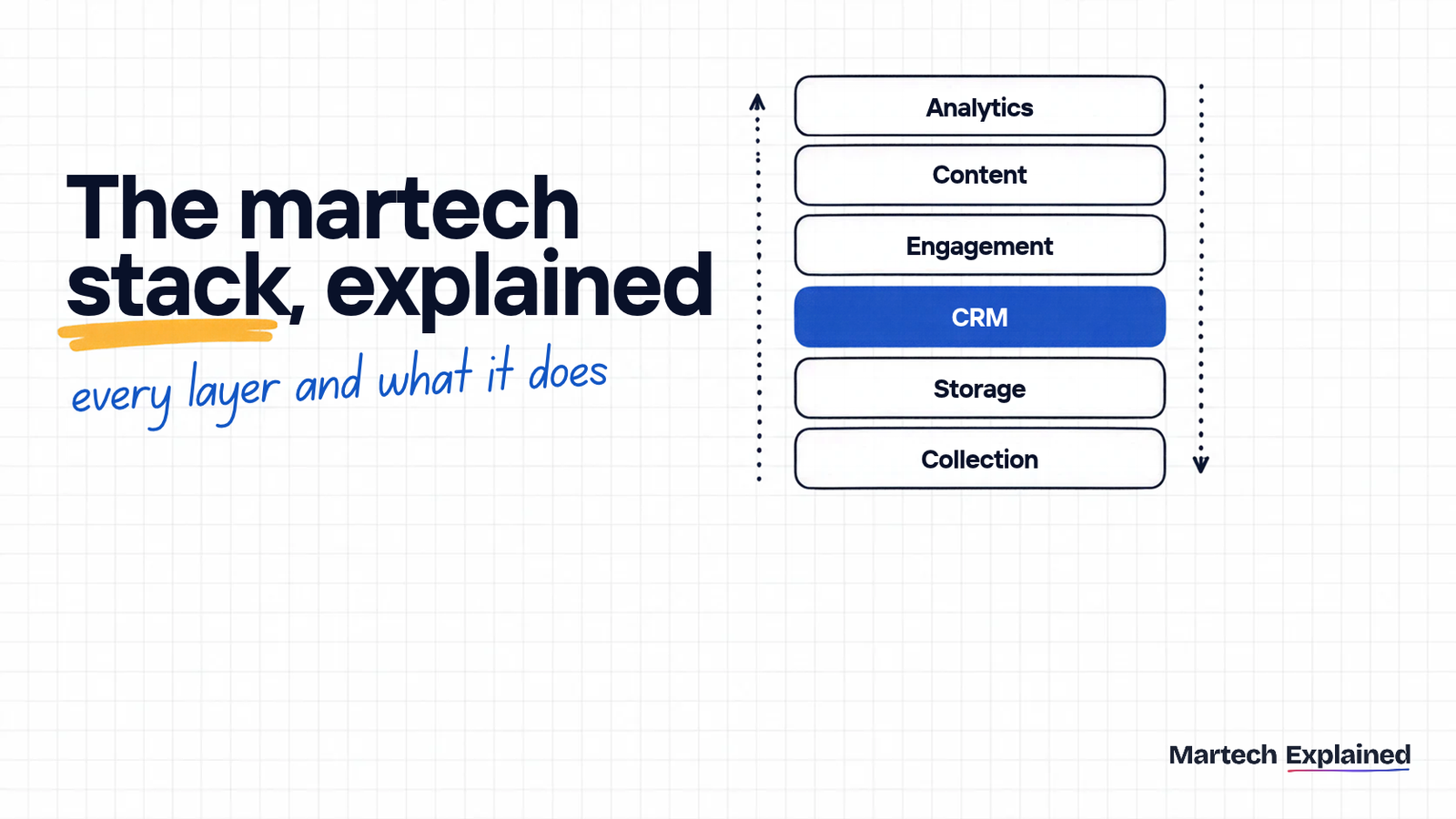
A martech stack is the set of marketing tools a company uses, connected so customer data flows between them. Most stacks have six layers: data collection, data storage, CRM, engagement, content and analytics. Together they run one loop: collect data about people, unify it, act on it and measure what worked.
The tools matter less than the connections. Gartner’s 2025 Marketing Technology Survey puts martech utilization at 49%, so teams use about half of what they pay for (Gartner). And in the 2025 MarTech Replacement Survey, 62.9% of companies that replaced a tool ended up with a bigger stack, not a smaller one (MarTech, 2026).
This guide builds on our plain-English guide to what martech is. It maps each layer and shows how data moves between them. Then it gives example stacks for three company sizes and a 5-question audit you can run this week. Any term you don’t know is in the martech glossary.
Martech stack in 30 seconds
- A martech stack is your marketing tools plus the connections that move data between them.
- It has 6 layers: collection, storage, CRM, engagement, content and analytics.
- Teams use 49% of what their martech can do (Gartner, 2025).
- 59.9% of companies replaced at least one martech tool in the past year, and 62.9% of those still grew their stack (MarTech Replacement Survey 2025).
- A startup can cover all six layers mostly on free tiers: Google Tag Manager, GA4, the BigQuery free tier, HubSpot's free CRM and Data Studio.
What is a martech stack?
A martech stack is every piece of software a marketing team uses, plus the integrations that pass data between them. The word comes from engineering, where a tech stack is the layers of software that make an app run, each one resting on the one below.
What turns a list of tools into a stack is the connections. Ten tools that each hold their own copy of your customers aren’t a stack. They’re ten subscriptions.
Most guides sort martech into the six categories of the chiefmartec Marketing Technology Landscape, which lists 15,505 products in 2026 (chiefmartec, 2026). Categories describe what a tool is. Layers describe where it sits in the flow of data, and that’s the view you need when you plan a stack or fix one.
What are the 6 layers of a martech stack?
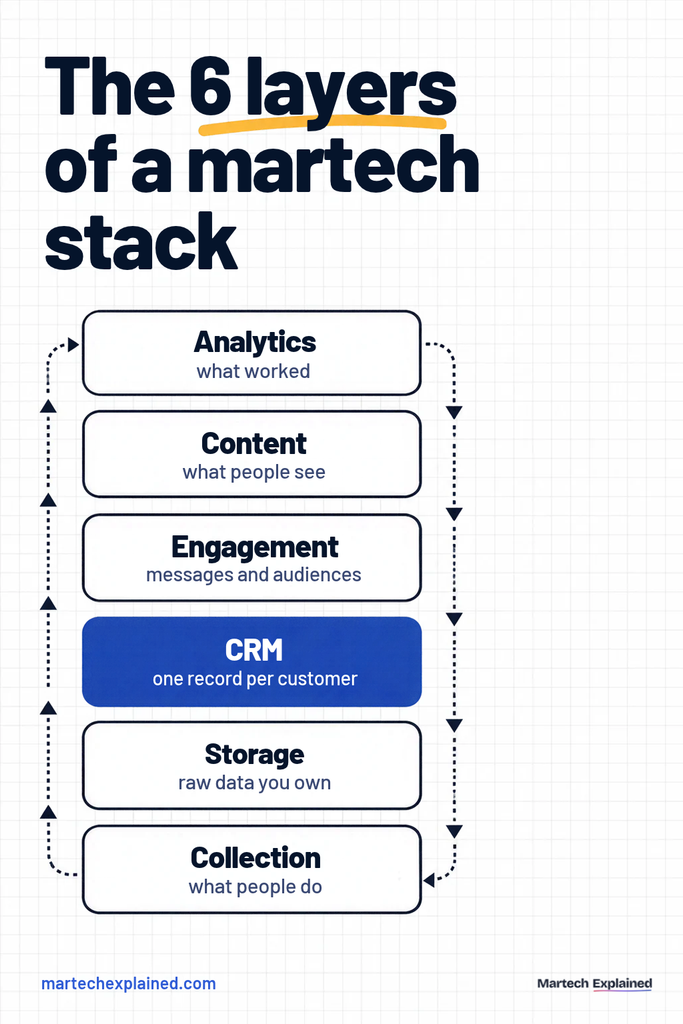
Every martech stack has six layers, whether a company runs 5 tools or 150. The layers follow the collect, unify, activate, measure loop: collection captures data, storage and the CRM unify it, engagement and content act on it, and analytics measures the result.
| Layer | Its job | Loop stage | Common tools |
|---|---|---|---|
| 1. Data collection | Captures what people do on your site, app and forms | Collect | Google Tag Manager, Segment, form tools, mobile SDKs |
| 2. Data storage | Keeps raw data in one place you control | Unify | BigQuery, Snowflake, a customer data platform (CDP) |
| 3. CRM | Holds one record per contact or account, with its history | Unify | HubSpot, Salesforce, Zoho CRM |
| 4. Engagement | Sends messages and builds audiences | Activate | Brevo, Mailchimp, HubSpot Marketing Hub, ad platform audiences |
| 5. Content | Creates and publishes what people see | Activate | WordPress, Webflow, Canva, Semrush |
| 6. Analytics | Shows what worked and what it cost | Measure | GA4, Data Studio, a BI tool |
1. Data collection
The collection layer records what people do: page views, clicks, form fills, sign-ups and purchases. Every layer above it inherits its mistakes, so it’s the first place to look when numbers don’t match between tools.
Google Tag Manager (GTM) is the default for websites. It loads your tracking tags from one container, so you can add a GA4 event or an ad pixel without a code release. Segment does a similar job for teams with a website and an app. You send each event once, and Segment forwards it to every tool that needs it. It calls these sources and destinations (Segment docs).
A newer option is server-side tagging. Data goes from the browser to a server you control, and you decide what each vendor receives. Google says this gives you “full control over how that data is shaped” (Google Tag Manager docs).
Signs this layer is broken: event names that differ between tools, form fills in the CRM that never show up in GA4, and campaign links tagged by hand. A free UTM builder keeps every campaign link on one naming rule.
2. Data storage
The storage layer keeps your raw data in one place you own, outside any single vendor. Small teams can skip it at first. It becomes necessary once you want to join website data with CRM or revenue data.
Most teams start with a cloud data warehouse. Google BigQuery’s free tier covers 10 GiB of storage and 1 TiB of queries a month, then charges $6.25 per TiB queried (Google Cloud, checked October 2026). GA4 can export raw events to BigQuery at no charge for the link itself, with a limit of 1 million events a day on standard properties (Google Analytics Help).
A customer data platform (CDP) is the other route. It builds one profile per person and sends audiences to other tools. Many teams now get a similar result from a warehouse plus reverse ETL, which copies modeled data from the warehouse back into the CRM and email tools.
Signs this layer is missing: every month someone exports CSVs from three tools into a spreadsheet to answer one question.
3. CRM
The customer relationship management (CRM) system holds one record per person or company, with every email, call, deal and form fill attached. It’s the source of truth for who your customers are, so every other layer should read from it or write to it.
HubSpot’s free CRM allows 1,000 contacts and 2 users with no time limit. Its Starter plan is listed at $20 per seat a month, discounted for new customers (HubSpot pricing, checked October 2026). Salesforce is the usual choice once the sales team and its custom fields grow.
Signs this layer is broken: duplicate contacts, lifecycle stages nobody updates, and marketing and sales counting leads in different ways.
4. Engagement
The engagement layer is where you reach people: email, SMS, push notifications, in-app messages and the audiences you sync to ad platforms. It’s usually the first layer a team pays for.
It’s also the layer teams replace most. In the 2025 MarTech Replacement Survey, 19.4% of respondents replaced their marketing automation platform and 13.7% their email platform, down from 31.1% and 24.3% a year earlier (MarTech, 2026).
Small teams usually start with an email tool like Brevo, Mailchimp or MailerLite. Larger consumer brands add a customer engagement platform that runs email, push and in-app messages from one place.
Signs this layer is broken: segments built from stale lists, and the same person getting three emails in one day from three different tools.
5. Content
The content layer creates and publishes what people read and watch: your website, blog, landing pages, images and video. It includes a content management system (CMS) like WordPress or Webflow, design tools like Canva and SEO tools like Semrush or Ahrefs. CMS and web experience tools grew 21.4% to 612 products in the 2026 Marketing Technology Landscape (chiefmartec, 2026).
The part teams forget is the link to the rest of the stack. Every form on your site should write to the CRM, and every page should load the same tracking from the collection layer.
6. Analytics
The analytics layer shows what worked and what it cost. Web analytics like GA4 records behavior on your site, a dashboard tool turns it into reports, and attribution connects campaigns to revenue.
Google renamed Looker Studio to Data Studio, its original name, in April 2026 (Google Cloud release notes). It’s still free, and still the quickest way to put GA4, Google Ads and BigQuery data in one dashboard.
Signs this layer is broken: three dashboards showing three different lead counts, and reports nobody has opened in a month.
How does data flow between the layers?
In a working martech stack, data moves up through the layers and back down again. Collection feeds storage and the CRM, the CRM feeds engagement, and analytics reads from all of them to decide where the next dollar goes.
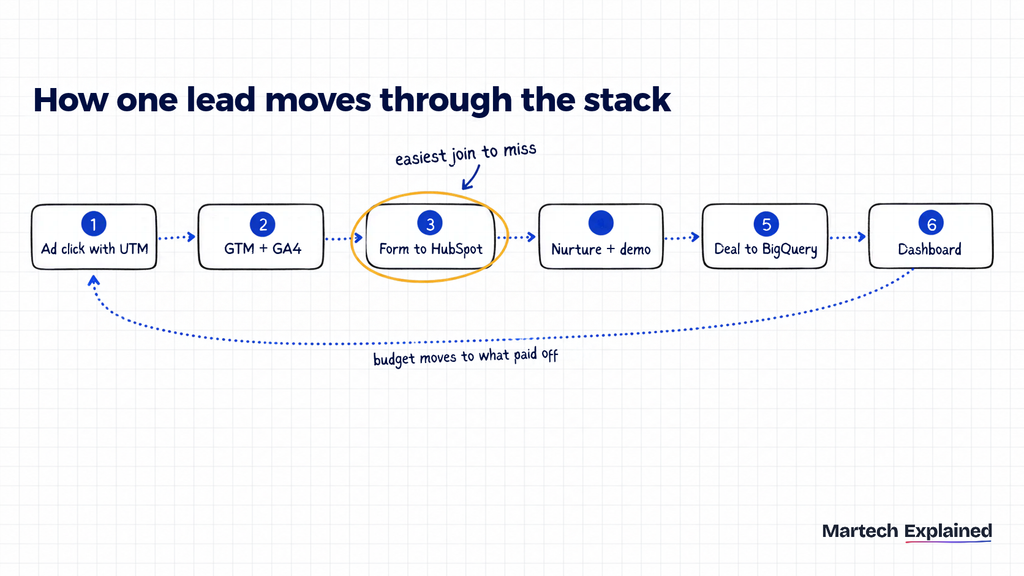
Here’s one lead’s path through a typical B2B stack:
- A marketer clicks a LinkedIn ad whose link carries UTM parameters.
- Google Tag Manager fires a GA4 page view, and a tag saves the UTM values so a form can read them later.
- She downloads a guide. The form creates a HubSpot contact, with the UTM source, medium and campaign in hidden fields.
- HubSpot enrolls her in a nurture sequence, and a sales rep books a demo.
- The deal closes. Revenue and the original UTM values are exported to BigQuery, next to the GA4 event export.
- A Data Studio dashboard shows cost per lead and revenue by campaign, and the team moves budget to what paid off.
Step 3 is the easiest join to miss. If the form doesn’t carry the UTM values into the CRM, the revenue in step 5 can’t be traced back to the ad in step 1. The dashboard then shows the deal with an unknown source.
5 ways to connect martech tools
How you connect the layers matters as much as which tools you pick. In the 2025 MarTech Replacement Survey, 42.7% of buyers cited data centralization and 37.1% cited integration capabilities when choosing a new tool, behind cost at 50.8% (MarTech, 2026).
| Method | How it works | Good for | Watch out for |
|---|---|---|---|
| Native integration | A built-in connector between two tools | Common pairs, like a CRM and an email tool | It syncs only the fields the vendor chose |
| Automation tool (Zapier, Make, n8n) | A workflow moves data when something happens | Small teams and quick one-way syncs | Per-task pricing grows with volume, and failures are easy to miss |
| Event pipeline (Segment, server-side GTM) | One tracking call is sent on to many tools | Teams with a website and an app | Without a tracking plan, bad data spreads faster |
| Warehouse plus reverse ETL | Data lands in the warehouse, and modeled data syncs back out | Growth and enterprise teams with a data person | Needs SQL skills and an owner for the models |
| Custom API | Your developers write the integration | Unusual tools or very high volume | It breaks when either side changes its API |
From the field
At Freo in 2021, MoEngage was in the stack, but the team wasn’t using it consistently. The engagement layer stalled because we didn’t yet have a shared plan for how the product should communicate with users, so I built an engagement charter around it. Until then, we had a tool available but weren’t getting its full value.
Martech stack examples by company stage
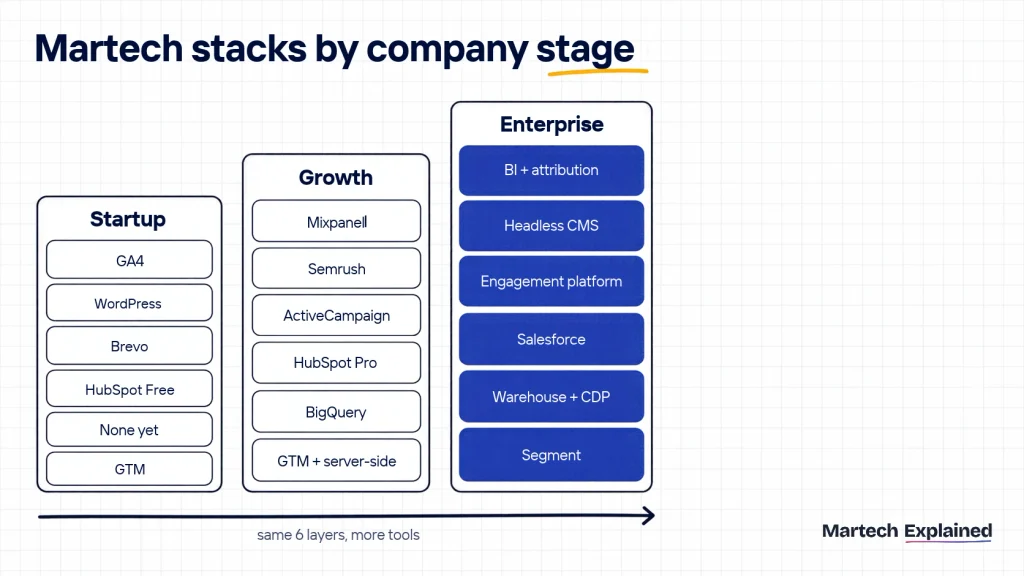
The six layers stay the same as a company grows. What changes is how many tools sit in each layer, whether there’s a storage layer at all, and who owns the connections.
| Layer | Startup (1 to 10 people) | Growth (10 to 100 people) | Enterprise (100+ people) |
|---|---|---|---|
| Collection | Google Tag Manager | Google Tag Manager plus server-side tagging | Segment or server-side GTM, mobile SDKs |
| Storage | None yet, or the GA4 export to BigQuery’s free tier | BigQuery or Snowflake | A warehouse plus a CDP or reverse ETL |
| CRM | HubSpot free CRM | HubSpot Professional or Salesforce | Salesforce or HubSpot Enterprise |
| Engagement | Brevo or MailerLite | HubSpot Marketing Hub or ActiveCampaign | A customer engagement platform plus marketing automation |
| Content | WordPress or Webflow, Canva | Adds Semrush or Ahrefs and a testing tool | Headless CMS, digital asset management, an experimentation platform |
| Analytics | GA4, Search Console, Data Studio | Adds product analytics like Mixpanel | A BI tool and multi-touch attribution |
| Who owns it | The founder or first marketer | A marketing operations hire | A martech or marketing ops team, working with IT |
At every stage, check that the stack pays for itself. The CAC and payback calculator shows what you spend to win a customer and how many months it takes to earn it back.
B2B vs B2C martech stacks
A B2B martech stack centers on the CRM, because deals involve several people at one company and a sales team. It adds lead scoring, account-based marketing tools and a clean handoff to sales.
A B2C martech stack centers on events and engagement. It needs app and website behavior data, push and in-app messaging, and personalization for thousands or millions of individual customers.
How to audit your martech stack in 5 questions
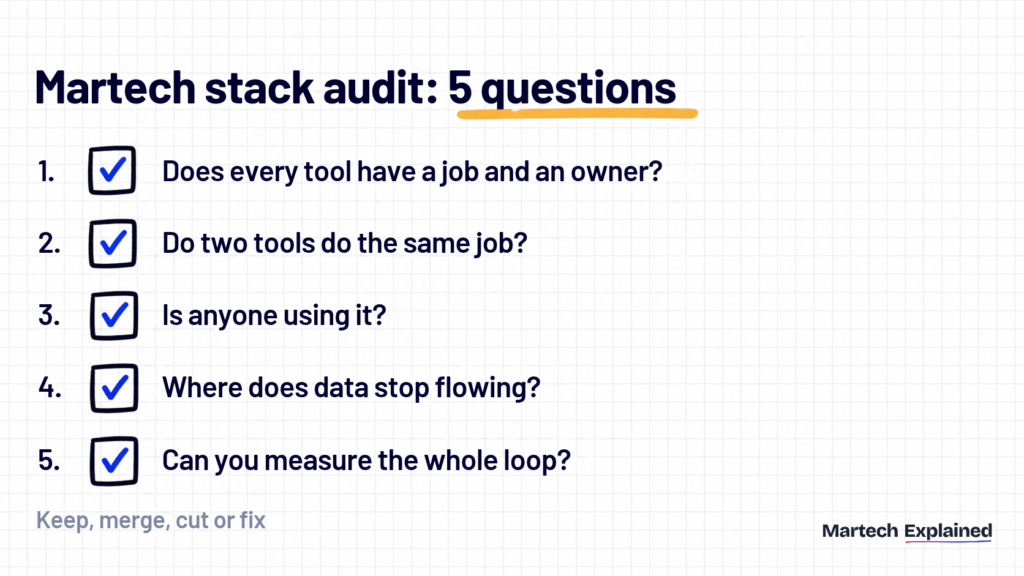
A martech stack audit tells you what to keep, merge or cut before your next renewals. Block two hours, open a spreadsheet with one row per tool and answer these five questions.
- Does every tool have a job and an owner? Write down each tool’s layer, owner, monthly cost and renewal date. A tool with no owner is the first one to cut.
- Do two tools do the same job? Sort the sheet by layer. Two email tools or two form builders usually means one team bought around another.
- Is anyone using it? Compare paid seats with active users in each admin panel. With martech utilization at 49% (Gartner, 2025), expect unused seats and features.
- Where does data stop flowing? Trace one real lead from first click to closed revenue. Every manual export or copy-paste you hit is a broken connection.
- Can you measure the whole loop? Try to report revenue by first-touch channel for last quarter. If you can’t, the gap is in collection, the CRM or analytics, and that’s where to spend next.
Use these columns for the audit sheet:
| Column | What to write |
|---|---|
| Tool | Name and plan |
| Layer | Collection, storage, CRM, engagement, content or analytics |
| Owner | One named person |
| Monthly cost | Licenses plus usage or AI credits |
| Renewal date | Plus the notice period to cancel |
| Seats paid vs active | From the tool’s admin panel |
| Data in and out | Which tools it reads from and writes to |
| Decision | Keep, merge, cut or fix |
From the field
We found promotional SMS being managed through both a standalone sending tool and MoEngage. We moved those campaigns into MoEngage and kept the SMS tool only for transactional messages. That saved about $6000 and cut roughly 240hrs per year of list prep and reconciliation.
Martech stack mistakes to avoid
Most broken stacks fail in the same few ways. Here are the ones to check for first:
- Buying the tool before naming the metric. Write down the number the tool should move, and today’s baseline, before you book a demo.
- Two sources of truth. Contacts live in the CRM, the email tool and a spreadsheet, and each count is different. Make the CRM the master and sync everything else to it.
- Integrating by CSV. A monthly export is a connection that fails silently the month its owner is on leave.
- An enterprise stack at seed stage. A CDP with one data source is an expensive copy of your CRM. Add the storage layer when you need to join two sources.
- Replacing without removing. Of the companies that replaced a tool, 62.9% still grew their stack and only 22.6% made it smaller (MarTech, 2026). Set a cancel date for the old tool before you sign for the new one.
- AI agents on top of messy data. Half of martech leaders say their stack isn’t ready for AI agents, and 45% say vendors’ AI agents fall short of the promised performance (Gartner, October 2025).
Frequently asked questions
What is the difference between a martech stack and a tech stack?
A tech stack is all the software a company runs on, including engineering, finance and HR tools. A martech stack is the marketing part of it. The two overlap at the edges, such as the data warehouse and the website.
What should be in a startup martech stack?
A startup martech stack needs one tool per layer, mostly on free tiers. A common setup is Google Tag Manager, HubSpot’s free CRM, Brevo or MailerLite, WordPress or Webflow, and GA4 with Data Studio. Skip the storage layer until you need to join website and revenue data.
Who owns the martech stack?
In small teams, the first marketer or the founder owns it. In larger companies, marketing operations owns it together with IT. Gartner research reported by Marketing Week found marketing funds only 50% of enterprise martech budgets, with IT covering 34% (Marketing Week, 2026).
Do I need a customer data platform?
Not until customer data lives in several places that need to agree, such as a website, an app and a CRM. Before that, a CRM plus the GA4 export to BigQuery covers most needs for far less money.
How often should you audit a martech stack?
Audit the whole stack once a year, and check each tool again before its renewal. Renewal is the point where you can negotiate or cancel without a penalty.
What is a composable martech stack?
A composable martech stack is built from separate tools joined around a shared data layer, usually a warehouse, instead of one all-in-one suite. Gartner lists a composable stack among the priorities of high-performing CMOs (Gartner, October 2025). The trade-off is more integration work and a need for data skills.
The bottom line
A martech stack is six layers and the connections between them. Get collection and the CRM right first, add a warehouse when you need to join data, and run the 5-question audit once a year.
Next in this series: Martech Glossary: 40 Terms Every Marketer Should Know.
Get the next guide in your inbox
One email a week: the new guides, one tool worth knowing and one number that matters.
Sources
- 2026 Marketing Technology Landscape Supergraphic, Scott Brinker, chiefmartec (via CustomerThink), May 2026
- Marketing technology research and 2025 Marketing Technology Survey, Gartner
- 2025 Martech Survey: What High-Performing Martech Teams Get Right, Gartner, October 2025
- Gartner survey finds 45% of martech leaders say vendor-offered AI agents fail to meet expectations, Gartner press release, October 2025
- Why martech stacks are getting messier, MarTech, May 2026
- Martech replacement is slowing, and that changes everything, MarTech, April 2026
- How have marketers’ tech stacks got so out of hand?, Marketing Week, February 2026
- Introduction to server-side tagging, Google Tag Manager, Google for Developers
- Connections overview, Segment documentation, Twilio
- BigQuery pricing, Google Cloud, checked October 2026
- BigQuery Export, Google Analytics Help
- CRM pricing, HubSpot, checked October 2026
- Data Studio release notes, Google Cloud, April 2026