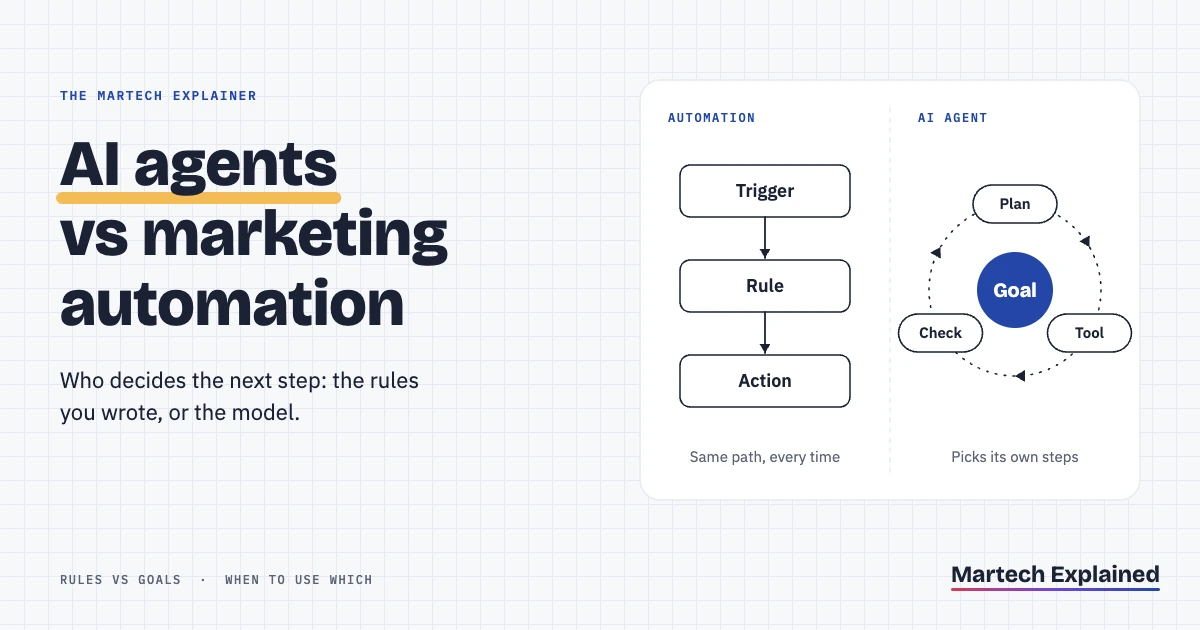
AI agents vs automation comes down to who decides the next step. Marketing automation follows rules you write in advance: if a lead fills in a form, send email A, wait two days, send email B. An AI agent gets a goal and a set of tools, then picks its own steps. Rules are predictable and cheap. Agents handle the messy cases rules miss.
Getting this choice wrong is expensive. Gartner predicts over 40% of agentic AI projects will be canceled by the end of 2027. The reasons it gives are rising costs, unclear value and weak risk controls (Gartner, June 2025). The same Gartner analyst says many use cases sold as agentic today don’t need an agent at all.
This guide builds on our plain-English guide to agentic marketing. It explains how each approach works, builds the same lead follow-up both ways, and ends with a decision table and a hybrid setup you can copy.
AI agents vs automation in 30 seconds
- Marketing automation runs a path you define in advance. An AI agent chooses its own path toward a goal, using tools you give it.
- Use rules when inputs are structured and a wrong action is costly. Use an agent when someone would otherwise have to read free text and decide.
- Over 40% of agentic AI projects will be canceled by the end of 2027, Gartner predicts (June 2025).
- 23% of companies are scaling an agentic AI system somewhere in the business, and another 39% are experimenting (McKinsey, November 2025).
- In the worked example below, model fees for one agent-handled lead come to about $0.02 on Claude Sonnet 5.5 and about $0.001 on Claude Haiku 5.5 (pricing checked October 2026).
In this guide
AI agents vs automation: the short answer
AI agents and marketing automation both act on your behalf, but they make decisions at different times. With automation, you made every decision when you built the workflow. An agent makes decisions while it runs, inside limits you set.
| Rule-based automation | AI agent | |
|---|---|---|
| What you define | Trigger, conditions, actions and timing | Goal, instructions, tools and limits |
| Who picks the next step | You, when you build it | The model, while it runs |
| Same input, same result? | Yes, every time | Not guaranteed |
| Free text (a form message, an email reply) | Only through keyword rules | Reads it and interprets the intent |
| A case it wasn’t built for | Follows the default branch or skips it | Tries to reason through it, sometimes wrongly |
| Cost per run | Usually included in the plan | Platform run plus model tokens on every step |
| How it fails | Stops, or repeats the same wrong step for everyone | Takes a wrong action that looks reasonable |
| How you debug it | Enrollment history, step by step | Read the trace of tool calls and outputs |
| Typical tools | HubSpot workflows, ActiveCampaign, Brevo, Zapier | n8n’s AI Agent node, agents built on a model API |
How does rule-based marketing automation work?
Rule-based marketing automation runs a fixed sequence when a trigger fires: a trigger, then conditions, then actions. The full anatomy, with eight examples, is in what marketing automation is and how it works.
In HubSpot, a workflow starts from an enrollment trigger that can be filter-based, event-based, on a schedule or a received webhook. Workflows come with the Professional and Enterprise tiers of Marketing Hub, Sales Hub, Service Hub and HubSpot’s other hubs (HubSpot Knowledge Base, updated August 2026).
The strength of rules is that you can predict them. Every record that meets the trigger gets the same steps, and each step is logged. The weakness is that a workflow only knows the fields you mapped. A form message that says “replacing our current tool by March, need pricing for 40 seats” looks the same to it as “just browsing”, unless a person reads it.
For the seven flows most B2B teams should build first, see these marketing automation workflows.
How does an AI agent work?
An AI agent is a language model running in a loop. It reads a goal, picks a tool, looks at the result and decides what to do next, until the goal is met or it hits a limit. Anthropic draws the line this way. In a workflow, models and tools follow paths written in code. An agent directs its own process and tool use (Anthropic, December 2024).
Every marketing agent has four parts: a model, instructions, tools and memory. In n8n, you connect a chat model and at least one tool to the AI Agent node. The agent then decides which tools to call to finish the task (n8n docs). Tools are what make it an agent. Without them, it’s a text generator.
An AI agent’s strength is reading unstructured input and handling cases you didn’t plan for. Its weaknesses are the mirror image. It may treat two near-identical leads differently, it pays for tokens on every step, and it can be manipulated. Prompt injection, where text the model reads changes its behavior, is the top risk in the OWASP Top 10 for LLM applications 2025 (OWASP, 2025). A lead form is text a stranger writes.
Same task, built both ways: inbound lead follow-up
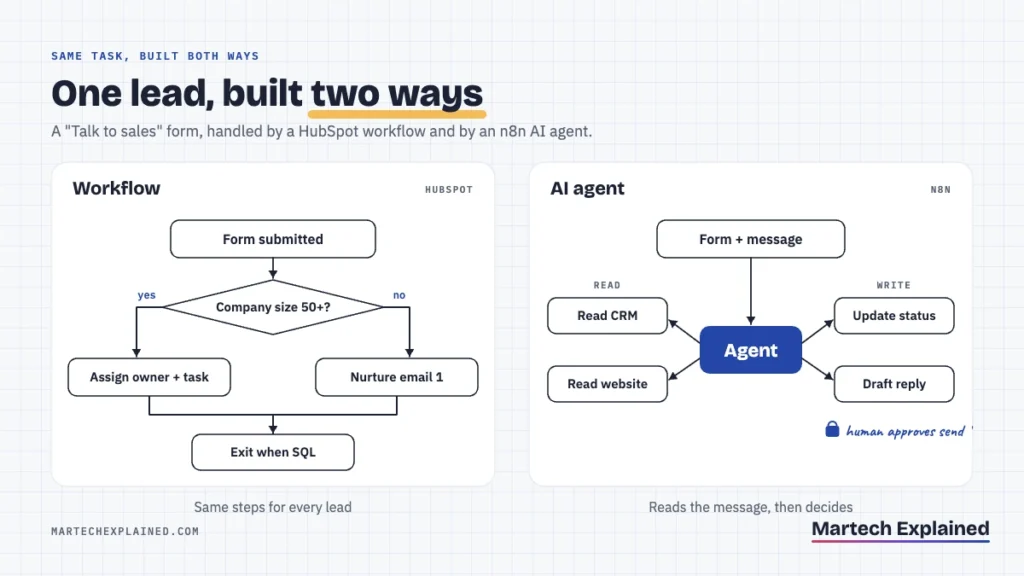
The task is a “Talk to sales” form on a B2B SaaS site. The goal is to reply fast to good-fit leads and send the rest to nurture. Both versions are based on public documentation for HubSpot workflows and n8n’s AI Agent node, not on a production build.
Version A: a HubSpot workflow
- Trigger. The contact submits the “Talk to sales” form (an event-based enrollment trigger).
- Branch on fit. If company size is 50 or more employees and the country is in your sales regions, take the fit path. Otherwise, take the nurture path.
- Fit path. Rotate the contact to a sales owner, create a task called “Call within 1 business hour” and send the owner an internal notification.
- Nurture path. Send nurture email 1 now, wait 3 days, then send email 2.
- Exit rule. Unenroll the contact when the lifecycle stage becomes sales qualified lead (SQL) or a meeting is booked.
Version A runs the same way for every lead and adds no cost per run. It also misses the 12-person company whose message says the parent company wants 200 seats. And it fast-tracks the student who picked “1,000+ employees” from the dropdown.
Version B: an n8n AI agent
- Trigger. A HubSpot trigger or webhook starts the workflow when the form is submitted.
- Instructions. “Decide whether this lead fits our ideal customer profile. If yes, draft a reply offering two meeting times. If not, set lead status to Nurture. Never mention pricing, discounts or contract terms.”
- Read-only tools. Get the HubSpot contact and company, check calendar availability and fetch the company’s website.
- Narrow write tools. Update one HubSpot property (lead status) and create an email draft. Put the send tool behind human review: n8n can require approval before the agent runs specific tools (n8n docs).
- Structured output. Fit (yes or no), a one-sentence reason, the route and the draft, saved as a note on the contact.
Version B reads the free-text message and the company’s website, so it catches the 12-person subsidiary. It also costs tokens per lead, may score two similar leads differently, and must treat the website it reads as untrusted input.
When should you use AI agents vs marketing automation?
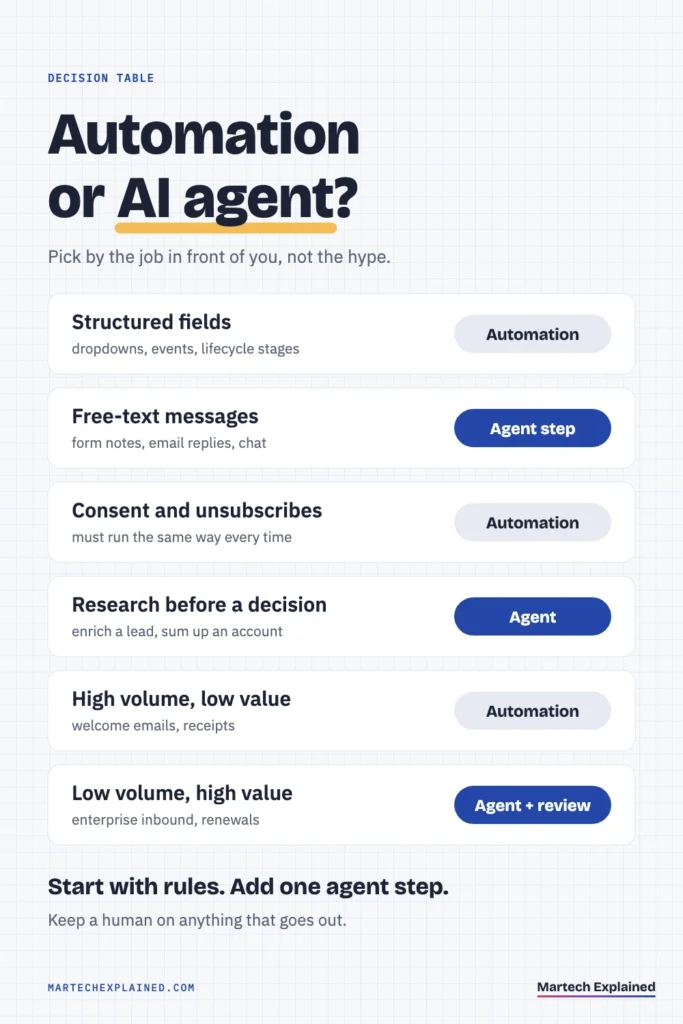
Use rule-based automation when you know the path and a wrong action is expensive. Use an AI agent when the input needs reading and a person would otherwise do the triage. Gartner’s advice is similar: agents where decisions are needed, automation for routine workflows and assistants for simple retrieval (Gartner, June 2025).
| Situation | Use | Why |
|---|---|---|
| Inputs are structured fields: dropdowns, events, lifecycle stages | Automation | Rules handle them exactly, at no extra cost |
| Input is free text: form messages, email replies, chat | Agent step | A model can read intent; keyword rules miss it |
| A wrong action reaches customers or spends money | Automation, or an agent with human approval | Mistakes repeat at scale |
| Consent and compliance: unsubscribes, deletion requests, double opt-in | Automation | Must run the same way every time, with an audit trail |
| Research before a decision: enrich a lead, summarize an account | Agent | The steps change with each record |
| High volume, low value per run: welcome emails, receipts | Automation | Token cost and variation add risk with no upside |
| Low volume, high value: enterprise inbound, at-risk renewals | Agent with review | Worth the cost per run and the review time |
How do the cost and risk of AI agents and automation differ?
Marketing automation costs a fixed plan fee and fails the same way every time. An AI agent adds a variable fee per step and can fail differently on each run.
Cost
In HubSpot, workflows come with Professional and Enterprise subscriptions, so a single workflow run adds nothing to the bill. n8n charges per execution, where one execution is a full run of a workflow however many steps it has. The Starter plan is €20 a month for 2,500 executions and Pro is €50 a month for 10,000, both billed annually (n8n pricing, checked October 2026). The self-hosted Community Edition is free.
The agent then adds model fees on every loop. Claude Sonnet 5.5 lists $2 per million input tokens and $10 per million output tokens. Claude Haiku 5.5 lists $0.10 and $0.50 for prompts up to 100,000 tokens (Anthropic pricing, checked October 2026).
A worked example, with assumed numbers: each lead takes 3 model calls, using about 6,000 input tokens and 800 output tokens in total.
| Model | Input cost per lead | Output cost per lead | Per lead | Per 1,000 leads |
|---|---|---|---|---|
| Claude Sonnet 5.5 | $0.012 | $0.008 | $0.020 | $20 |
| Claude Haiku 5.5 | $0.0006 | $0.0004 | $0.001 | $1 |
Measure your own token counts from the agent’s logs before you budget. Tool definitions, the website text the agent fetches and retries all add input tokens. The bigger cost is people: someone has to write the instructions, test edge cases and review drafts. In an October 2025 Gartner survey, 45% of martech leaders said vendor-offered AI agents fail to meet their expectations for business performance (Gartner, October 2025).
Risk
Automation fails loudly. A broken branch sends 500 people the wrong email, but you find it in the enrollment history and fix one step.
Agents fail quietly. OWASP calls this excessive agency (LLM06 in its 2025 list): damaging actions taken because of unexpected, ambiguous or manipulated model output. It traces the cause to too much functionality, too many permissions or too much autonomy (OWASP, 2025). Its fixes translate directly to marketing:
- Fewer tools. Give the agent only the tools the task needs. A lead-scoring agent doesn’t need a delete-contact tool.
- Narrow permissions. Read-only access wherever possible, and a CRM user that can edit one or two properties.
- Human approval. A person approves anything high-impact: sends, discounts, budget changes, deletions.
- Logs and rate limits. Log every tool call and cap runs per hour, so a bad loop is caught before it reaches your whole database.
What does a hybrid setup look like?
A hybrid setup keeps automation as the rails and uses an AI agent for one judgment step inside it. Anthropic recommends the same order: find the simplest solution that works and add complexity only when it’s needed (Anthropic, December 2024).
Four hybrid patterns cover most marketing use cases:
- Classifier. The workflow sends the form message to a model and gets back one label, such as sales, support, partner or spam. The workflow branches on the label.
- Researcher. The agent enriches a lead and writes a three-line summary to a CRM field. The workflow does the routing.
- Drafter. The agent writes the reply, and a rep approves it before it’s sent.
- Gated agent. The agent runs only when the workflow calls it, with a daily cap on runs.
Move one workflow to a hybrid in 5 steps
- Pick the manual step. Find the step a person does by hand today. It’s usually reading a free-text field and deciding where the record goes.
- Collect 20 real examples. Pull 20 past records with the answer a person gave, so you know what correct looks like.
- Replace only that step. Add a model call that returns one label from a fixed list. Keep every other step as a rule.
- Run it in shadow mode. For two weeks, log the model’s label next to the human’s decision without acting on it.
- Switch it on with a gate. Go live when it agrees with the human on the cases that matter. Keep human approval on anything customer-facing.
Frequently asked questions
What is the difference between an AI agent and a chatbot?
A chatbot answers messages in a conversation. An AI agent takes actions with tools toward a goal, such as updating a CRM record or drafting an email, and often runs with no chat window at all. Gartner calls the rebranding of chatbots and assistants as agents “agent washing” (Gartner, 2025).
Will AI agents replace marketing automation?
AI agents are unlikely to replace marketing automation for routine flows. Consent handling, compliance and high-volume sends need the same result every time, which rules give and agents don’t. Expect agent steps to appear inside the automation tools you already use instead.
What are agentic workflows?
“Agentic workflow” is used in two ways. Anthropic calls fixed-path systems that use a model “workflows” and model-directed ones “agents”. Many vendors use “agentic workflow” for ordinary automation with one AI step. Ask the vendor who decides the next step: the rules or the model.
How much does it cost to run an AI agent for marketing?
An AI agent costs a platform fee per run plus model tokens per step. In this guide’s worked example, model fees came to about $20 per 1,000 leads on Claude Sonnet 5.5 and about $1 on Claude Haiku 5.5, before review time. Your real number depends on how many steps the agent takes and how much text it reads.
Can an AI agent email customers on its own?
An AI agent can email customers if you give it a send tool. Keep a human approval step on sending until you’ve reviewed enough drafts to trust it. OWASP lists human approval for high-impact actions as a core fix for excessive agency.
Do I need clean data before using AI agents?
Yes. An agent makes decisions from your CRM and analytics data, so duplicates and stale fields become wrong actions. Half of martech leaders say their stack isn’t ready for AI agents (Gartner, October 2025). Start with the audit in the martech stack explained.
The bottom line
Automation is for paths you can draw in advance. Agents are for decisions that need reading. Start with automation, add one agent step where a person reads free text today, and keep a human on anything that goes out.
Next in this series: Best AI Agents for Marketing Teams in 2026.
Get the next guide in your inbox
One email a week: the new guides, one tool worth knowing and one number that matters.
Sources
- Gartner predicts over 40% of agentic AI projects will be canceled by end of 2027, Gartner press release, June 2025
- Gartner survey finds 45% of martech leaders say vendor-offered AI agents fail to meet expectations, Gartner press release, October 2025
- The state of AI in 2025: Agents, innovation, and transformation, McKinsey, November 2025
- Building effective agents, Anthropic, December 2024
- Create workflows, HubSpot Knowledge Base, updated August 2026
- AI Agent node, n8n documentation
- Tools AI Agent node: human review for tools, n8n documentation
- n8n plans and pricing, n8n, checked October 2026
- Pricing, Claude Platform Docs, Anthropic, checked October 2026
- LLM01:2025 Prompt Injection, OWASP Gen AI Security Project, 2025
- LLM06:2025 Excessive Agency, OWASP Gen AI Security Project, 2025