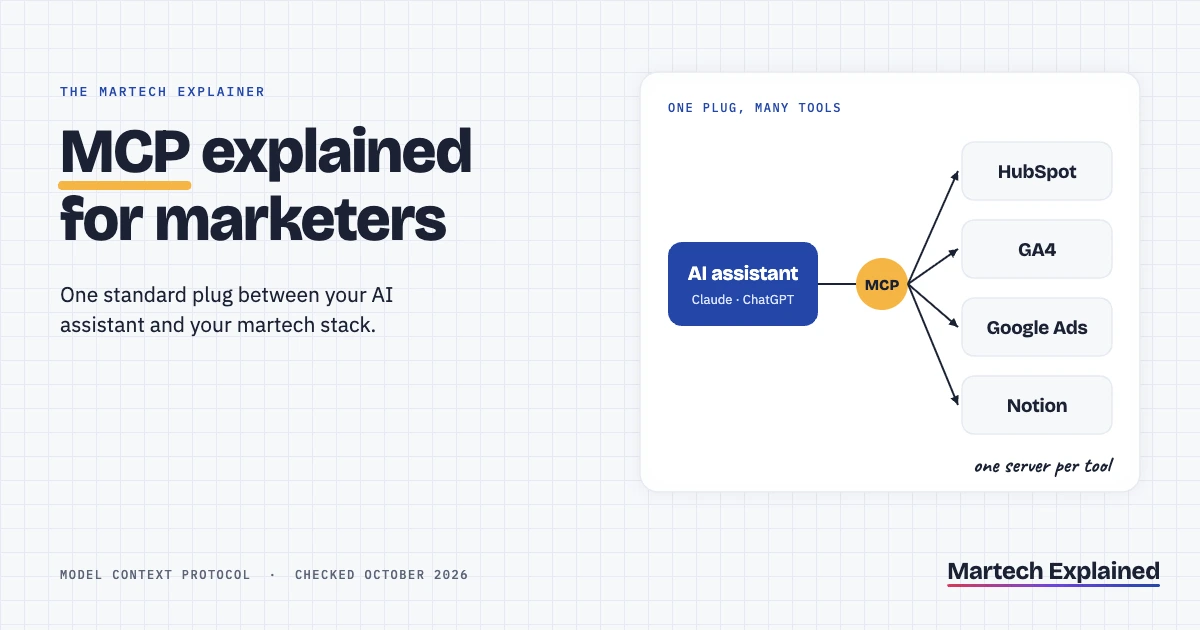
The Model Context Protocol (MCP) is an open standard that lets an AI assistant such as Claude or ChatGPT connect to your other tools. With an MCP server in place, the assistant can read your CRM, run a GA4 report or update a Notion page from a chat. It works the same way across every tool that supports it.
MCP spread fast. Anthropic introduced it in November 2024, and by December 2025 there were more than 10,000 active public MCP servers (Anthropic, December 2025). ChatGPT, Gemini, Microsoft Copilot, Cursor and Visual Studio Code all support it. For marketers, that means the AI tool you already pay for can now reach the data in your martech stack.
This guide explains MCP in plain terms, then shows six marketing uses and the servers available for common tools. MCP is the plumbing behind most of what agentic marketing promises, so it’s worth understanding before you connect anything.
MCP in 30 seconds
- MCP is an open standard that connects AI assistants to tools and data. Anthropic introduced it in November 2024 and handed it to a Linux Foundation fund in December 2025.
- An MCP server sits in front of one tool, such as HubSpot or GA4, and tells the assistant what it can read or do there.
- HubSpot’s remote MCP server has been generally available since April 2026. It can create and update contacts, companies, deals and tickets.
- Google’s Analytics MCP server is read-only. It runs GA4 reports from a chat but can’t change your property.
- Connect only servers you trust, start with read-only access, and keep approvals on anything that writes.
In this guide
What is the Model Context Protocol (MCP)?
The Model Context Protocol (MCP) is a shared set of rules for how an AI application talks to outside tools and data. Anthropic describes it as “an open standard” for secure, two-way connections between data sources and AI tools (Anthropic, November 2024).
The easiest way to think about MCP is as a universal plug. Before MCP, every AI app needed its own custom integration for every tool. With MCP, a tool builds one server, and any AI app that speaks MCP can use it.
Since December 2025, MCP has been run by the Agentic AI Foundation, a fund under the Linux Foundation co-founded by Anthropic, Block and OpenAI. No single AI company controls the standard, which is one reason rival products adopted it. If you want the one-line version for a colleague, the MCP entry in the martech glossary has it.
How MCP works: hosts, clients and servers
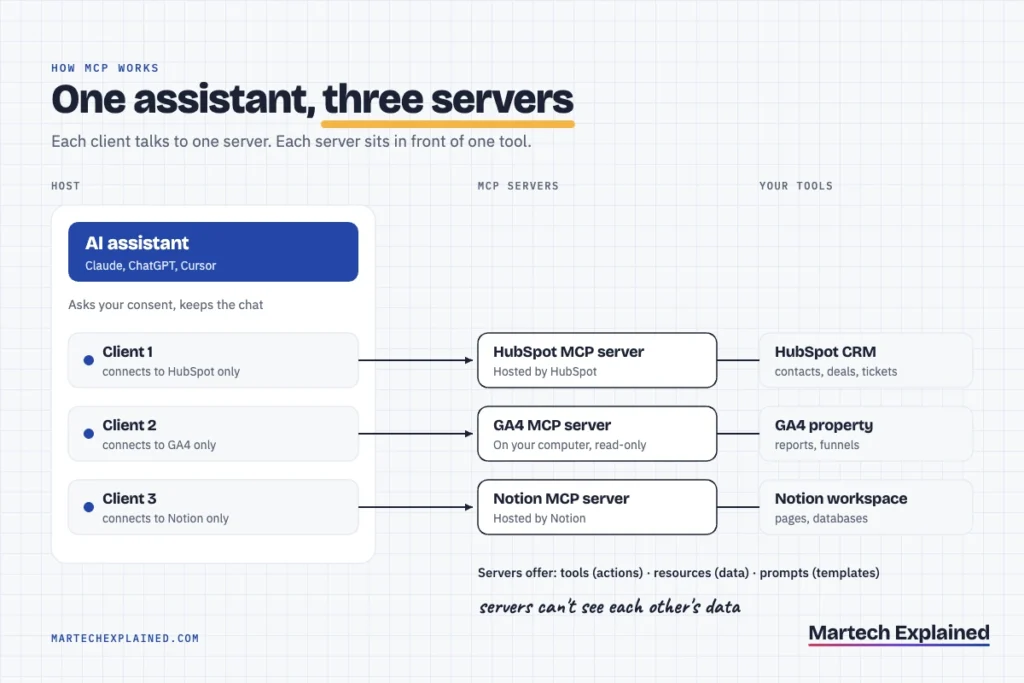
MCP works through three parts: a host, clients and servers. The current specification (version 2026-07-28) defines them this way (MCP specification):
- Host: the AI app you use, such as Claude, ChatGPT or Cursor. It manages connections, asks for your consent and decides what each server can see.
- Client: a connector inside the host. Each client talks to exactly one server.
- Server: a small program in front of one tool, such as HubSpot or GA4. It can run on your computer or as a remote service the vendor hosts.
Each server offers the assistant up to three kinds of capability:
| Capability | What it is | Marketing example |
|---|---|---|
| Tools | Actions the AI can take | Run a GA4 report, update a HubSpot deal |
| Resources | Data the AI can read | A brand guidelines page in Notion |
| Prompts | Saved instructions the server provides | A “weekly campaign summary” template |
One design rule matters for privacy. The specification says servers should not be able to read the whole conversation or “see into” other servers. Your HubSpot server never sees what you asked the GA4 server.
Why MCP matters for marketers
MCP matters for marketers because it moves AI from writing about your data to working with it. A chat assistant without MCP only knows what you paste in. With MCP, it can pull the numbers itself and act on them, within the permissions you give it.
Three changes follow from that:
- Less copy and paste. Weekly reports, CRM lookups and campaign checks happen in the chat, not across five browser tabs.
- One assistant, many tools. The same assistant can join data across HubSpot, GA4 and your ad accounts in one answer.
- Less vendor lock-in. A server built for MCP works in Claude, ChatGPT and other hosts, so switching assistants doesn’t mean rebuilding integrations.
MCP is also what most marketing agents run on. When an agent “uses tools”, those tools are often MCP servers. The difference between an agent and a fixed workflow is covered in AI agents vs marketing automation.
6 marketing use cases for MCP
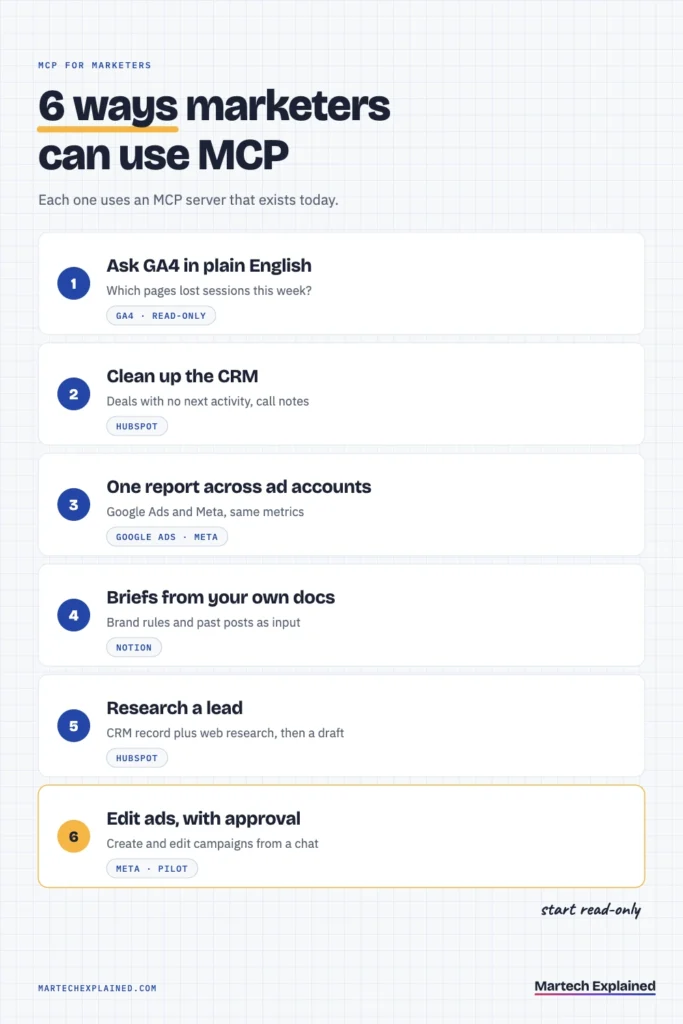
The best MCP use cases for marketers are the repeat tasks where you already copy data from one tool into another. Each example below uses a server that exists today.
- Ask GA4 questions in plain English. “Which landing pages lost the most sessions this week compared with last week?” The GA4 server runs the report and the assistant explains it.
- Clean up and query the CRM. Find open deals with no next activity, or log a call note on a contact, without opening HubSpot.
- Write one weekly report across ad accounts. Pull Google Ads and Meta results into a single summary with the same metrics side by side.
- Build briefs from your own docs. Pull brand guidelines and past posts from Notion, so a content brief follows your rules instead of generic ones.
- Research a lead before outreach. Combine the CRM record with web research and draft a first message for a person to approve.
- Edit ads with approval. Meta’s connectors can create and edit campaigns from a chat. Keep this one as a pilot, because a wrong edit spends money.
MCP servers for common martech tools
Several major martech vendors now publish their own MCP servers. The table covers the ones most marketing teams use, checked in October 2026. Prefer a server from the vendor itself over a third-party one, because it follows the vendor’s own permissions.
| Tool | Server | Where it runs | What it can do |
|---|---|---|---|
| HubSpot | Remote HubSpot MCP server, by HubSpot | Hosted by HubSpot | Reads CRM, marketing and content data; creates and updates contacts, companies, deals, tickets and activities |
| Google Analytics 4 | Google Analytics MCP server, by Google | On your computer | Read-only: runs reports, realtime, funnel and conversion reports |
| Google Ads | google-ads-mcp, on Google’s googleads GitHub | On your computer | Searches account data and lists the accounts you can access |
| Meta Ads | Meta Ads AI Connectors, by Meta | Hosted by Meta (open beta) | Reports, plus creating and editing campaigns, ad sets and ads |
| Notion | Notion MCP, by Notion | Hosted by Notion | Searches, reads and edits pages and databases |
A few details matter before you connect each one:
- HubSpot: the remote server became generally available on April 13, 2026. It respects your existing user permissions, so it can only see and edit records you already can (HubSpot developer changelog, April 2026).
- GA4: Google says the server is “available for read requests only”. It needs Python 3.10 or later and a Google Cloud project, so it’s easier with technical help (Google for Developers).
- Google Ads: setup needs a Google Cloud project with the Google Ads API enabled. Querying live accounts needs a developer token with at least Explorer access (googleads on GitHub).
- Meta Ads: the connectors opened in beta in April 2026 (PPC Land, April 2026). The best AI agents for marketing list rates them as a pilot.
- Notion: you sign in with OAuth, and the assistant can then reach whatever your Notion account can (Notion developer docs).
Is MCP safe? Security and permissions
MCP is as safe as the servers you connect and the permissions you grant them. The protocol itself includes consent and authorization rules. A badly built or malicious server can still leak data or take actions you didn’t intend.
Anthropic’s own help page warns that custom connectors aren’t verified by Anthropic, and that malicious servers may contain prompt injections (Claude Help Center). A prompt injection is text hidden in data that tries to give the AI new instructions. The MCP project’s security guidance also tells developers to request only the permissions a task needs (MCP security best practices).
Run these checks before you connect any MCP server:
- Use the vendor’s own server. HubSpot, Google, Meta and Notion all publish one. A third-party server sees every record it touches.
- Start read-only. Turn off write tools until the read side has worked for a few weeks.
- Connect with your own login. On a team plan, a shared API key gives every user the same access. Use OAuth sign-in where the server offers it.
- Keep approvals on writes. Only choose “Allow always” for tools you’d trust to run without you watching.
- Read the exact command for local servers. A local server runs on your computer with your permissions, so check what it executes before you approve it.
- Check with IT first. Customer data flowing into an AI tool can fall under your company’s data and privacy policies.
How to try MCP in 15 minutes
You can try MCP in about 15 minutes by connecting HubSpot’s remote server to Claude. You need a HubSpot account and a Claude plan. Custom connectors work on every Claude plan, though the Free plan allows only one (Claude Help Center).
- Open the connectors page. In Claude, go to Customize, then Connectors.
- Add a custom connector. Click “Add”, then “Add custom connector”. Name it HubSpot and enter https://mcp.hubspot.com as the server URL (HubSpot developer docs).
- Sign in to HubSpot. Approve the connection when HubSpot asks. Review the permissions on the consent screen before you accept.
- Turn off write tools. In the connector’s settings, disable the tools that create or update records for now.
- Ask a real question. Try “List open deals over $5,000 with no activity in the last 14 days.” Check two of the answers against HubSpot to see how accurate it is.
ChatGPT supports MCP too. OpenAI’s Apps SDK, which powers apps inside ChatGPT, builds on MCP (OpenAI, October 2025). HubSpot also offers ready-made connectors for both Claude and ChatGPT if you’d rather skip the custom setup.
Frequently asked questions
What does MCP stand for?
MCP stands for Model Context Protocol. It’s an open standard that connects AI assistants to outside tools and data. “Context” refers to the information the AI model gets from your tools to answer or act.
Is MCP the same as an API?
No. An API is how software talks to one specific tool, and every API is different. MCP is a standard layer on top: an MCP server usually calls the tool’s API, but presents it to any AI assistant in the same format.
Do I need to code to use MCP?
Not for remote servers. Connecting HubSpot, Notion or Meta’s connectors takes a URL and a sign-in. Local servers, such as Google’s GA4 and Google Ads servers, need a terminal and a Google Cloud project.
Which AI assistants support MCP?
Claude, ChatGPT, Gemini, Microsoft Copilot, Cursor and Visual Studio Code all support MCP, according to Anthropic’s December 2025 announcement. Support for custom servers varies by plan, so check your assistant’s help pages.
Can MCP change data in my CRM?
Yes, if the server allows it and you give permission. HubSpot’s remote server can create and update contacts, companies, deals and tickets. Start with write tools turned off and turn them on one at a time.
Who owns MCP?
The Agentic AI Foundation, a fund under the Linux Foundation, has run MCP since December 2025. Anthropic created MCP and co-founded the foundation with Block and OpenAI.
The bottom line
MCP is how AI assistants get into your martech stack. Start with one vendor-built server, read-only, on one task you repeat every week. Add write access only after the answers have proved reliable.
Next in this series: How to Build a Marketing AI Agent With n8n (Step by Step).
Get the next guide in your inbox
One email a week: the new guides, one tool worth knowing and one number that matters.
Sources
- Introducing the Model Context Protocol, Anthropic, November 2024
- Donating the Model Context Protocol and establishing the Agentic AI Foundation, Anthropic, December 2025
- Architecture, MCP specification version 2026-07-28, Model Context Protocol, checked October 2026
- Security best practices, Model Context Protocol, checked October 2026
- Remote HubSpot MCP server is now generally available, HubSpot developer changelog, April 2026
- Remote MCP server, HubSpot developer docs, checked October 2026
- Try the Google Analytics MCP server, Google for Developers, checked October 2026
- google-ads-mcp, googleads on GitHub, checked October 2026
- Meta opens its ad system to Claude and ChatGPT with new AI connectors, PPC Land, April 2026
- Notion MCP, Notion developer docs, checked October 2026
- Get started with custom connectors using remote MCP, Claude Help Center, checked October 2026
- Introducing apps in ChatGPT and the new Apps SDK, OpenAI, October 2025