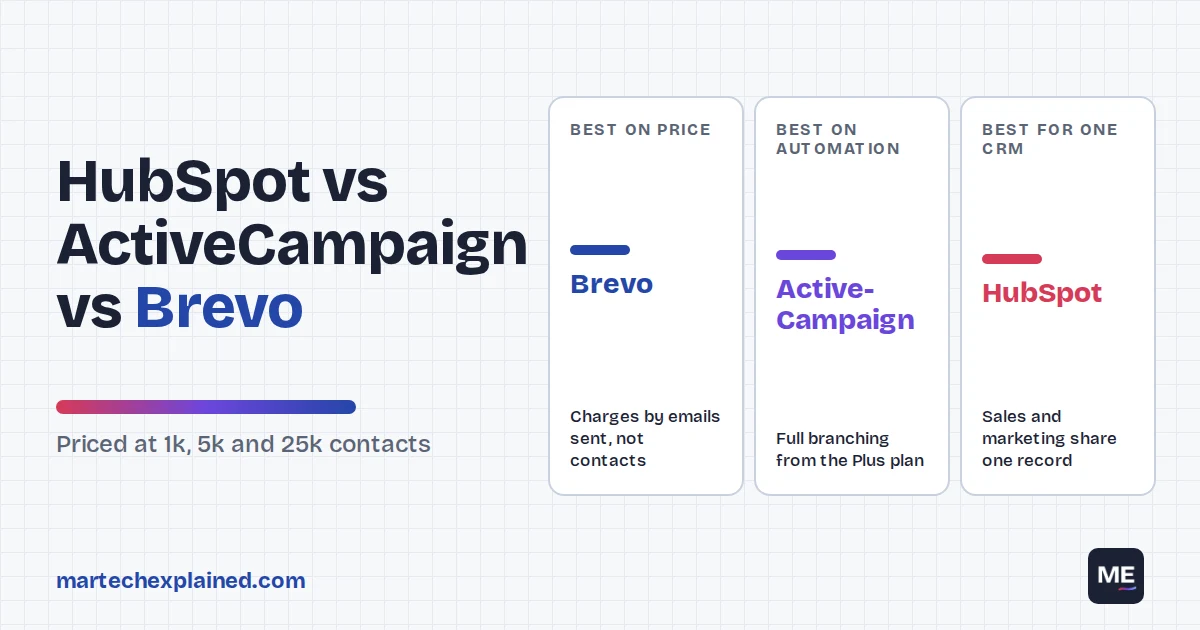
HubSpot, ActiveCampaign and Brevo are the three marketing automation platforms small teams shortlist most often. They solve the same problem in very different ways. HubSpot sells a CRM with marketing built in, ActiveCampaign sells automation depth, and Brevo sells low prices by charging for emails sent rather than contacts stored.
Picking wrong is expensive. Marketing automation was the most-replaced martech category for five years in a row through 2024 (MarTech, 2026). Most teams switch because the price jumped at the next contact tier, or because the plan they bought couldn’t build the workflow they needed.
This comparison prices all three at 1,000, 5,000 and 25,000 contacts and checks which plan can build the same 8-step welcome workflow. It also covers CRM, deliverability and who should pick which. If you’re new to the topic, start with what marketing automation is.
The verdict in 30 seconds
- Brevo is the cheapest at every list size we priced, because it charges by emails sent. Best for budget-led teams and large lists you email a few times a month.
- ActiveCampaign gives the deepest automation per dollar. Its Plus plan is the sweet spot; Starter is too limited for branching workflows.
- HubSpot is the pick when sales and marketing share one CRM. Starter is cheap, but Professional costs $890 a month plus a $3,000 onboarding fee.
- At 25,000 contacts, the full-automation plans cost about $129 (Brevo), $489 (ActiveCampaign) and $2,100 (HubSpot) a month, checked October 2026.
Table of Contents
How I tested
I've run HubSpot hands-on. For ActiveCampaign and Brevo, I compared plans, limits and month-to-month list prices on their pricing pages and plan documentation in October 2026. I then checked each plan against one welcome workflow spec. No vendor paid for or reviewed this post.
Quick verdict: HubSpot vs ActiveCampaign vs Brevo
The short answer: choose Brevo if price matters most, ActiveCampaign if automation matters most, and HubSpot if your sales team needs to live in the same CRM. Here’s how they compare on the things small teams ask about first.
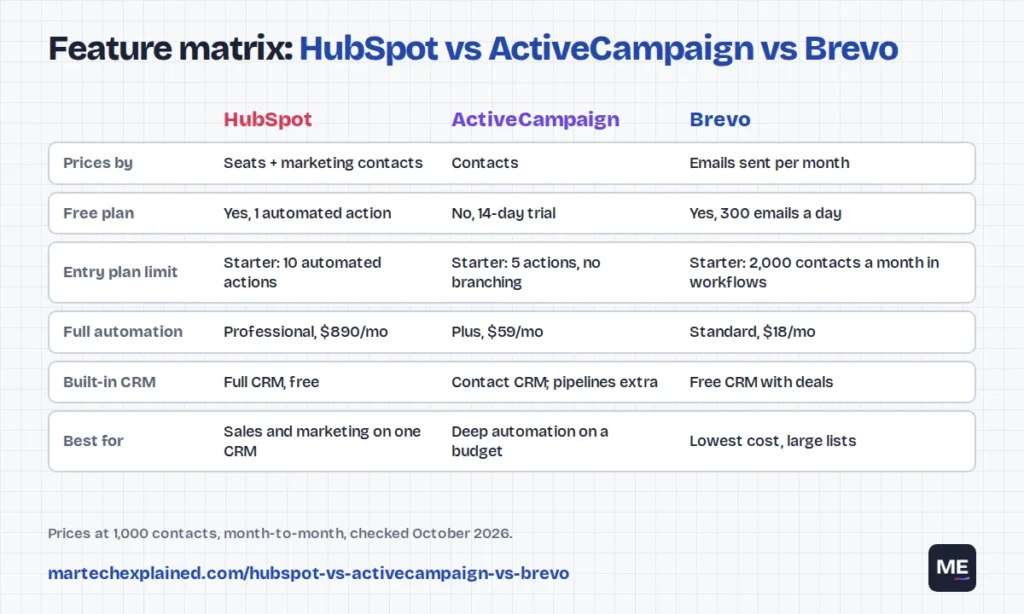
| HubSpot Marketing Hub | ActiveCampaign | Brevo | |
|---|---|---|---|
| Best for | Teams that want CRM and marketing in one place | Teams that want complex automation on a budget | Budget-led teams and large, infrequently emailed lists |
| Prices by | Seats plus marketing contacts | Contacts | Emails sent per month |
| Free plan | Yes, 1 automated action | No, 14-day trial | Yes, 300 emails a day |
| Entry plan, 1,000 contacts | $20 a month per seat (Starter) | $19 a month (Starter) | $9 a month (Starter) |
| Plan with full automation | Professional, $890 a month | Plus, $59 a month | Standard, $18 a month |
| Biggest catch | The jump from Starter to Professional | Starter allows only 5 actions and no branching | Starter caps automation at 2,000 contacts a month |
| Built-in CRM | Full CRM, free | Basic contact CRM; deal pipelines cost extra | Free CRM for contacts and deals |
Prices are month-to-month list prices in US dollars at 1,000 contacts, checked in October 2026. Annual billing is cheaper on all three.
Pricing at 1,000, 5,000 and 25,000 contacts
Price is where these tools differ most, because each one charges for something different. HubSpot charges per seat and per marketing contact. ActiveCampaign charges by contact count. Brevo charges by the number of emails you send each month.
To compare them fairly, we priced two plans for each tool: the cheapest paid plan, and the cheapest plan with unrestricted automation. For Brevo, we assumed four emails per contact per month, so 5,000 contacts means 20,000 sends.
Entry plans
| Contacts | HubSpot Starter (1 seat) | ActiveCampaign Starter | Brevo Starter |
|---|---|---|---|
| 1,000 | $20 | $19 | $9 |
| 5,000 | About $220 | $99 | $29 |
| 25,000 | About $1,220 | Not available (Starter stops at 10,000) | $69 |
Plans with full automation
| Contacts | HubSpot Professional (3 seats) | ActiveCampaign Plus (1 user) | Brevo Standard (3 users) |
|---|---|---|---|
| 1,000 | $890 (2,000 contacts included) | $59 | $18 |
| 5,000 | About $1,140 | $179 | $65 |
| 25,000 | About $2,100 | $489 | $129 |
| One-off fees | $3,000 onboarding | None | None |
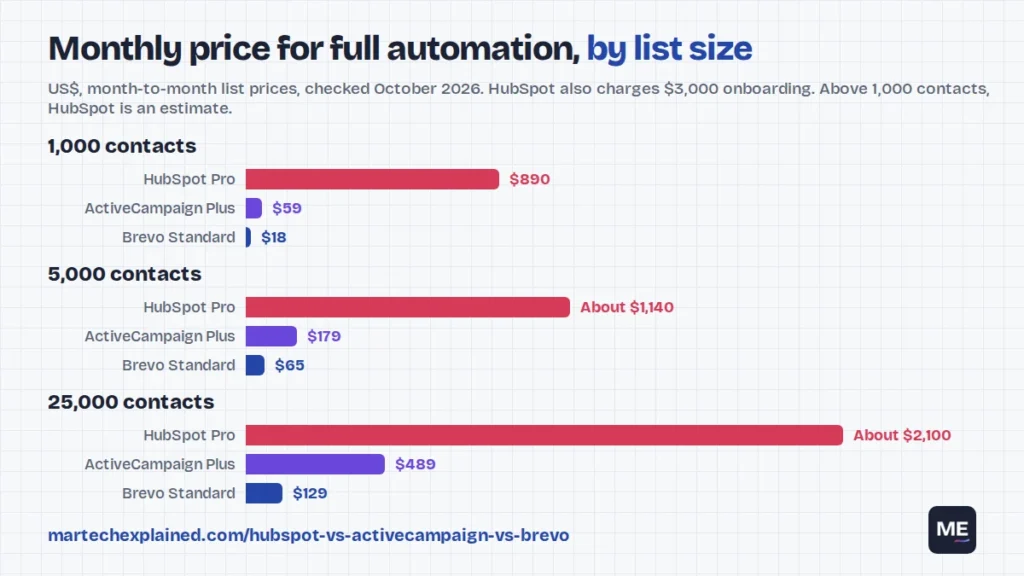
Sources: HubSpot pricing, ActiveCampaign prices at each contact tier and Brevo prices by email volume. HubSpot sells extra marketing contacts in tiers, so its 5,000 and 25,000 figures are estimates. Starter adds about $50 a month per extra 1,000 contacts (Docket, 2026). On Professional, going past 2,000 contacts moves you to a 5,000-contact tier that adds roughly $250 a month (HubSpot, 2026). Get an exact quote from HubSpot’s calculator before you commit.
What the numbers mean
- Brevo stays cheap as lists grow. You pay for sends, not storage, so a 25,000-contact list you email monthly costs far less than on the other two.
- ActiveCampaign scales steadily. Plus goes from $59 to $489 between 1,000 and 25,000 contacts, with no onboarding fee.
- HubSpot has one big cliff. Starter is cheap until you need unlimited automation. Professional costs about 45 times Starter at 1,000 contacts, plus $3,000 up front.
- Marketing contacts are a HubSpot lever. You can store contacts as non-marketing for free and pay only for those you email. Clean this up before every renewal.
Year-one cost at 5,000 contacts
Monthly prices hide one-off fees and seat costs. Here’s what each plan costs in its first year at 5,000 contacts, billed month to month.
| Plan | Monthly | One-off fees | Year one |
|---|---|---|---|
| Brevo Standard | $65 | None | $780 |
| ActiveCampaign Plus | $179 | None | $2,148 |
| HubSpot Starter (1 seat) | About $220 | None | About $2,640 |
| HubSpot Professional (3 seats) | About $1,140 | $3,000 onboarding | About $16,680 |
Annual billing lowers all four figures. Even so, HubSpot Professional costs roughly eight times ActiveCampaign Plus in year one at this size. That gap is the price of a full CRM and HubSpot’s connected sales and service tools, so only pay it if you’ll use both.
Costs that aren’t on the pricing card
- Extra seats. HubSpot Professional includes 3 core seats; more start at $45 a month each on annual billing.
- CRM add-ons. ActiveCampaign charges extra for deal pipelines on current plans.
- Branding removal. Brevo Starter shows Brevo branding unless you pay for an add-on.
- SMS and WhatsApp. All three charge for text messages separately, usually through prepaid credits.
- Contact creep. Lists grow every month. Price your plan at twice today’s list, not at today’s size.
Automation builder compared
All three have a visual, drag-and-drop workflow builder. The real difference is how much of it each plan includes. The cheapest plans all have a limit that bites quickly. To decide what to build first, use these 7 B2B workflows.
| HubSpot | ActiveCampaign | Brevo | |
|---|---|---|---|
| Free plan | 1 automated action | No free plan | Automation included, 2,000 contacts a month can enter workflows |
| Entry plan | Starter: up to 10 automated actions | Starter: up to 5 actions per automation, no branching | Starter: same 2,000-contact automation cap |
| Full automation from | Professional: unlimited actions, up to 300 workflows | Plus: full builder with branching | Standard: no automation contact cap |
| Split testing inside workflows | Professional | Pro plan and above | Standard and above (email A/B tests) |
| Channels in workflows | Email, SMS, ads, CRM tasks, internal alerts | Email, SMS, site messages, CRM updates | Email, SMS, WhatsApp, CRM updates |
Sources: HubSpot pricing, Email Tool Tester on ActiveCampaign plans and Omnisend on Brevo plans, checked October 2026.
The same welcome workflow in all three
To make the limits concrete, here’s one 8-step welcome workflow most small teams need. It sends three emails, checks engagement and alerts sales about engaged leads.
- Trigger: someone submits the newsletter or lead form.
- Send email 1 straight away: what to expect and your best resource.
- Wait 2 days.
- Send email 2: a case study or how-to.
- Wait 3 days.
- Branch: did they click a link in email 1 or 2?
- If yes: tag as engaged and notify the contact owner.
- If no: send email 3 with one clear call to action.
- Exit: anyone who books a demo or buys leaves the workflow.
| Plan | Can it build this workflow? |
|---|---|
| HubSpot Starter | Yes, within its 10-action limit, but with little room to add steps |
| HubSpot Professional | Yes, with no action limit |
| ActiveCampaign Starter | No. It allows 5 actions and no branching |
| ActiveCampaign Plus | Yes |
| Brevo Starter | Yes, but only 2,000 new contacts a month can enter it |
| Brevo Standard | Yes, with no contact cap |
Note that the branch uses clicks, not opens. Apple Mail Privacy Protection loads emails in the background, so opens are unreliable as a trigger on every platform.
CRM and sales features
If a sales team follows up on your leads, the CRM matters as much as the email builder. This is where HubSpot pulls ahead, and where ActiveCampaign quietly charges extra.
- HubSpot is a CRM first. Contacts, companies, deals, tasks and pipelines are free, and every marketing email and form fill shows on the contact’s timeline. Sales tools such as sequences and meeting links sit in the separate Sales Hub.
- ActiveCampaign includes a contact CRM with tags, custom fields and lead scoring. Deal pipelines for a sales team are a paid add-on on current plans, so price it in if sales will use it.
- Brevo includes a free CRM with contacts, companies, deals and tasks. It covers a small sales team, but reporting and pipeline automation are basic next to HubSpot.
A simple rule: if your sales team already uses Salesforce or another CRM, you don’t need HubSpot’s CRM. Pick the email and automation tool that syncs cleanly with the CRM you have. Two systems both acting as the customer record is how the joins in your martech stack break.
Email deliverability and templates
Deliverability depends more on your sending setup than on which of these three you pick. None of them publishes inbox placement rates you can compare fairly, so be wary of reviews that rank them on it.
What matters is that you can meet the rules. Since February 2024, Gmail requires bulk senders to authenticate their domain, offer one-click unsubscribe and keep spam rates below 0.30% (Google). All three support domain authentication with SPF, DKIM and DMARC, plus one-click unsubscribe.
| HubSpot | ActiveCampaign | Brevo | |
|---|---|---|---|
| Domain authentication | Yes, all paid plans | Yes, all plans | Yes, all plans |
| Templates | Drag-and-drop editor, themed templates | Large template library, drag-and-drop editor | Drag-and-drop editor, template library |
| Send limits | Monthly limit tied to your contact tier | 10 to 15 times your contact limit | Set by the email volume you buy |
For a list under 25,000 contacts, a shared IP on any of the three is fine if your list is clean. A dedicated IP only helps when you send high, steady volumes; with low volume it can hurt.
Integrations
All three connect to the tools a small team usually runs: website forms, WordPress, Shopify and other ecommerce platforms, Google Ads, Meta lead ads, Slack and Zapier. The differences are in depth, not count.
- HubSpot has the largest app marketplace of the three and two-way sync with Salesforce. Its own CMS, ads and service tools connect natively.
- ActiveCampaign has strong ecommerce and CRM connectors, and site tracking that feeds page visits into automations.
- Brevo covers the main ecommerce and form tools and adds its own SMS, WhatsApp and transactional email under one account.
Before you buy, list the three systems that must sync both ways, usually your CRM, website forms and ecommerce store. Then test those during the trial, not after signing. Tag every link in your automated emails with UTM parameters so GA4 can tell workflows apart; the free UTM builder keeps the names consistent.
Mistakes to avoid when choosing
Most regret with these tools comes from how they were bought, not from the tool itself. These are the most common ones.
- Buying on the 1,000-contact price. Every tool looks cheap at 1,000 contacts. Check the price at the list size you expect in 12 months.
- Buying the entry plan for a branching workflow. ActiveCampaign Starter can’t branch, and HubSpot Starter stops at 10 actions. Write your workflow down first, then check the plan.
- Running two customer records. If you add HubSpot’s free CRM next to an existing CRM, decide which one owns the contact record before you sync anything.
- Skipping the trial setup. Connect your forms and CRM during the trial and build one real workflow. Problems with sync show up in week one, not in the demo.
- Ignoring the exit path. Check how easily you can export contacts, tags and engagement data. Workflows never transfer, so keep a written copy of each one.
Who should pick which?
Here’s the decision in plain terms, based on team type and list size.
Choose Brevo if
- Budget is the main constraint, or you’re a solo marketer or small business.
- You have a large list but email it a few times a month.
- You want email, SMS and WhatsApp campaigns from one account.
Choose ActiveCampaign if
- Automation is the core of your marketing: nurture tracks, scoring and behavior-based paths.
- You have 1,000 to 25,000 contacts and want room to grow without a one-off fee.
- Your sales team already has a CRM, or doesn’t need full pipelines.
Choose HubSpot if
- Sales and marketing need one shared CRM and one view of each customer.
- You can afford Professional when you outgrow Starter’s 10 actions.
- You want marketing, sales and service tools from one vendor as you scale.
Skip all three if
You only send a monthly newsletter to a small list. A basic email tool will do the job for less until you have workflows worth automating.
Frequently asked questions
Is HubSpot better than ActiveCampaign?
HubSpot is better if you need a CRM that sales and marketing share. ActiveCampaign is better if you need complex automation on a small budget. At 5,000 contacts, ActiveCampaign Plus costs $179 a month against about $1,140 for HubSpot Professional (October 2026).
Is ActiveCampaign better than Brevo?
ActiveCampaign has deeper automation, site tracking and lead scoring. Brevo is much cheaper for large lists because it charges by emails sent, and it adds SMS and WhatsApp. Choose by whether automation depth or cost matters more to you.
Is Brevo really free?
Yes. Brevo’s free plan lets you send 300 emails a day and includes basic automation and a CRM. Emails carry Brevo branding, and automation is limited to 2,000 contacts a month.
Does HubSpot Starter include marketing automation?
Yes, but with limits. HubSpot’s Starter plan allows up to 10 automated actions, while Professional removes the action limit and allows up to 300 workflows (checked October 2026).
Which is cheapest for 10,000 contacts?
Brevo, in most cases, because its price depends on emails sent rather than contacts stored. ActiveCampaign comes next. HubSpot is the most expensive at that size once you need its Professional plan.
Can I switch platforms later?
Yes. Contacts, tags and custom fields export as CSV files. Workflows don’t transfer and must be rebuilt, so document your workflows before you switch.
The bottom line
Brevo wins on price, ActiveCampaign wins on automation depth, and HubSpot wins when sales and marketing need one CRM. Price your plan at twice today’s list size, and check that it can build your three most important workflows before you sign.
Next in this series: 7 marketing automation workflows every B2B team should run. For the basics behind this comparison, read what marketing automation is and the martech glossary.
Get the next guide in your inbox
One email a week: the new guides, one tool worth knowing and one number that matters.
Sources
- Marketing Hub pricing, HubSpot, checked October 2026
- Marketing Hub pricing guide, HubSpot blog, September 2026
- HubSpot Marketing Hub pricing 2026, Docket, 2026
- Pricing, ActiveCampaign, checked October 2026
- ActiveCampaign pricing, Email Tool Tester, August 2026
- Pricing, Brevo, checked October 2026
- Brevo pricing, CostBench, August 2026
- Brevo pricing, Omnisend, September 2026
- Email sender guidelines, Gmail Help, Google
- Mail Privacy Protection and privacy, Apple
- Martech replacement is slowing, and that changes everything, MarTech, April 2026